

August 15, 2025
Drupal CMS is here, and aims to provide a smoother setup experience for marketers, designers, and content creators. But what does it mean for those who are already in the Drupal ecosystem? Let’s take a look at what makes Drupal CMS tick.
Recipe for Success
Rather than adopting AI At its core, Drupal CMS is a hand-picked set of recipes, with a curated install experience provided by an install profile. When installing, you are immediately greeted by a list of “add-ons“ to jump-start your site’s capabilities.
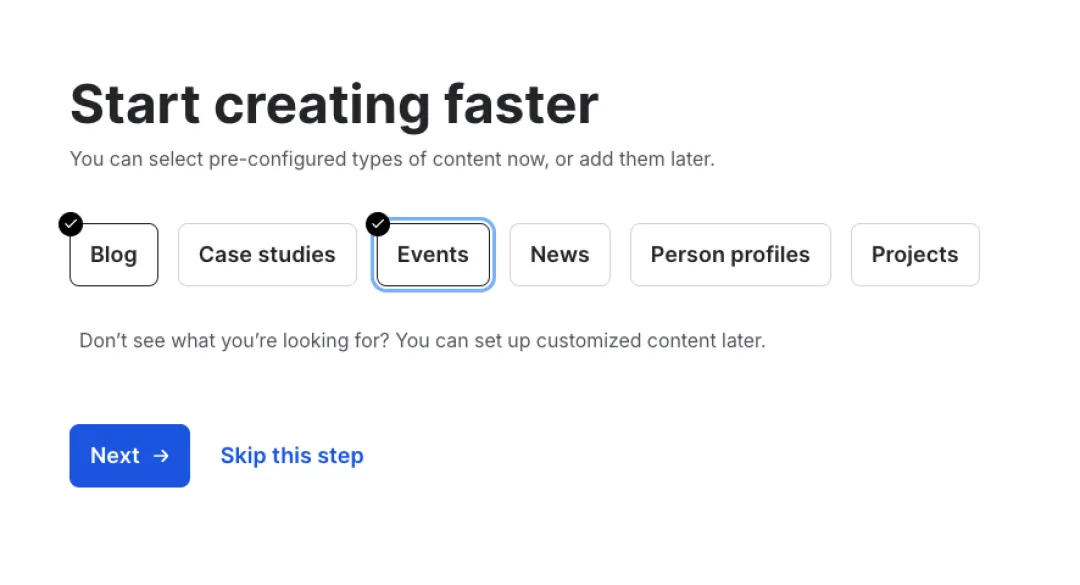
This list comes from the composer.json file for the drupal/drupal_cms_starter recipe, which has a “suggest” section:
"suggest": { "drupal/drupal_cms_blog": "Adds a blog post content type and listing page.", "drupal/drupal_cms_case_study": "Adds a case study content type and listing page.", "drupal/drupal_cms_events": "Adds an event content type and listing page.", "drupal/drupal_cms_news": "Adds a news content type and listing page.", "drupal/drupal_cms_person": "Adds a person profile content type.", "drupal/drupal_cms_project": "Adds a project content type and listing page." },
All of these (and a few more) can be applied later through a new "Recommended" tab in the Extend section of the admin, so users needn’t stress about adding these at the start. In fact, recipes cannot be “un-applied”, so it might make more sense to wait.
Community Driven
One of the best parts of this new install experience is the way it highlights some of the amazing modules contributed to Drupal by the community. Those recommended recipes at the beginning do more than just add a bunch of content types, they provide a pre-configured experience around that content type powered by community modules.
Let’s take the Events recipe as an example. Applying this recipe
- Creates an Event content type with image, date, and address fields
- Adds the Geocoder and leaflet modules to display the event location on a map widget
- Creates a view displaying Events, and adds the view page to the main nav
- Provides a “Add to Calendar” button next to the event date field
The whole process is super streamlined, while also ensuring that it provides great UX out of the box.
Project Browser
The Project Browser is a tool that simplifies the process of finding and installing modules, themes, and other projects. The "Browse modules" section provides a comprehensive library of modules, while the "Recommended" section provides feature-sets using pre-configured recipes that automate installation and configuration. When there is a version conflict between modules, unfortunately, the resulting dialogue with the conflict error is not easy to read and appears to be a direct dump of a failed composer process.
“Recommended” recipes have some limitations - once installed, they cannot be uninstalled or "un-applied" in the classical sense. This can be a concern, as it may lead to configuration issues or module conflicts. The Recipe Installer Kit itself is still in alpha stage.
Despite these concerns, the project browser is designed with a specific target audience in mind: non-technical site builders who may not be comfortable using the command line or Git. According to the Drupal documentation, the primary persona for the project browser is individuals who have little to no developer experience. As stated on Drupal CMS, the project browser aims to provide a simple and intuitive way for these users to find and install the functionality they need, without requiring extensive technical knowledge.
Future of Drupal CMS
If you’ve been following along since Starshot, you’ll notice that there’s one big initiative missing from Drupal CMS 1.0.0 - Experience Builder. This is a highly anticipated effort at making front-end layout and design more accessible and easy to use. Planned now for release with Drupal CMS 2.0, this will help to make Drupal CMS an even better option for its target audiences.
For now, however, the front-end theming and design portion of Drupal CMS is more limited than some would like. A robust layout and design system such as Experience Builder will be a welcome addition.
Choosing Between Drupal Core and Drupal CMS
You may be wondering whether to use the new Drupal CMS or stick with standard Drupal. The answer depends on your specific needs and goals. Here are some factors to consider:
Comparing the Options
AI Model
Revised Text
Complexity of the project
Drupal Core
Suitable for complex websites with custom requirements
Drupal CMS
Suitable for simpler websites with pre-configured content types and workflows
Content management needs
Drupal Core
Offers a robust content management system, but requires more configuration
Drupal CMS
Offers a streamlined content management experience with pre-configured content types and workflows
Community-driven modules
Drupal Core
Offers access to a wide range of community-driven modules, but requires more effort to configure
Drupal CMS
Offers pre-configured experiences powered by community-driven modules
Customization and flexibility
Drupal Core
Offers a high degree of customization and flexibility
Drupal CMS
Offers a more streamlined experience, but with less flexibility
Learning curve
Drupal Core
Steeper learning curve, especially for new users
Drupal CMS
More accessible and user-friendly, especially for new users
Ultimately, the choice between standard Drupal and Drupal CMS depends on your specific needs and goals. If you're looking for a streamlined content management experience with pre-configured recipes and ready-to-go modules, Drupal CMS is a great option. If you need a high degree of customization and flexibility, standard Drupal might be a better choice.
For more information on Drupal CMS and standard Drupal, you can visit the official Drupal website or check out the Drupal CMS documentation .